11. What happens when AliExpress removes a product or variant
In short: the GetDropFlow price and stock sync never deletes anything from your store on its own.
What the sync does
- Every 10 minutes it checks a batch of products (20 per round by default), updates the sale price with your pricing rules and updates the stock.
- When AliExpress raises a cost, your price rises with it through the same pricing rules; when it drops, it drops. There is no separate "price surge protection" switch: your rules are the only basis.
When a product or variant is gone at AliExpress
- The first time it is missing, it is only noted. Nothing is changed.
- If AliExpress still says "gone" for 24 hours in a row (the number of hours can be changed in the settings; 0 means never automatic), the variant's stock is set to 0.
- Only when every variant of a product has been set to 0 this way, the product is switched off (not deleted).
- If AliExpress offers it again later, the stock is restored and a product that was switched off by this feature is switched on again.
- Temporary network errors or rate limits are never taken for "gone".
Where to look
Admin menu GetDropFlow → Needs attention lists every such variant: when it was first missing, whether its stock was set to 0 and whether the product was switched off. 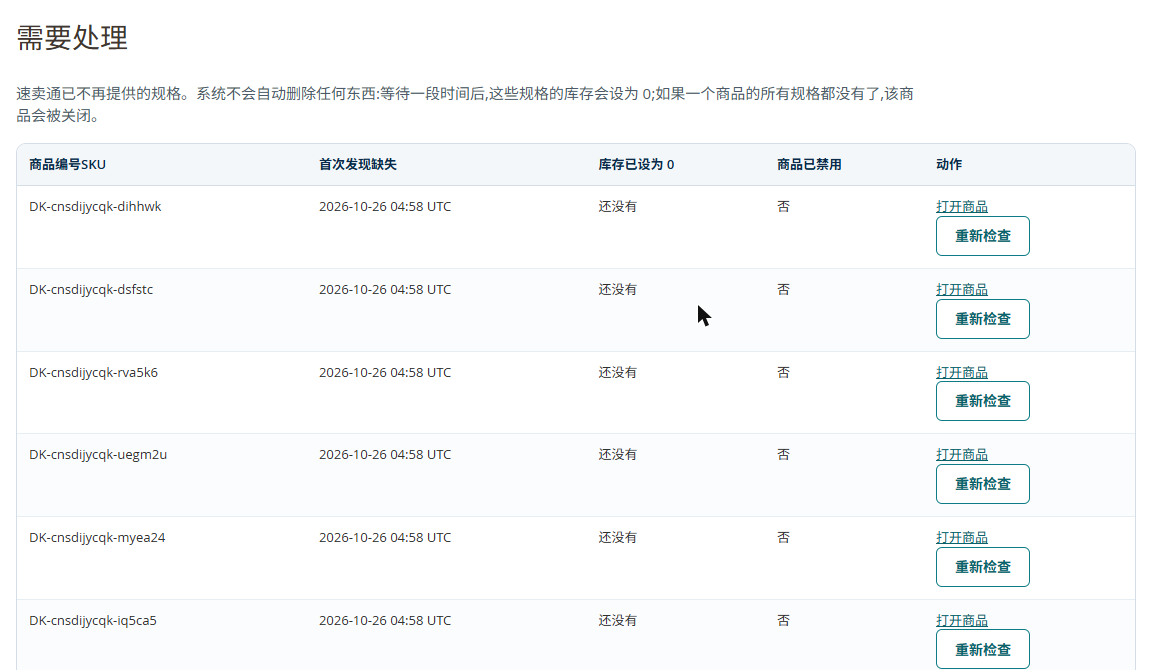
Columns, left to right: SKU, first seen missing, stock set to 0, product switched off, actions.
- Open the product: opens the product page, where you decide yourself whether to delete it.
- Check again: forgets the entry; the next sync looks at the variant again.
The log also names the SKUs that failed (at most the first 10 per reason).
A product that keeps failing with temporary errors
If the same product stops the sync for 3 rounds in a row, the next round skips it so the products behind it still get updated; the log says "skipped this round". Once it works again it is synced normally.
Shopify version
The rule is exactly the same as above (24 hours, stock set to 0 first, the product becomes a draft only when ALL variants were zeroed, everything restored when AliExpress offers it again, nothing ever deleted). Only the place to look differs:
- Open the GetDropFlow app → Automatic sync. The section "Variants AliExpress no longer offers" shows three numbers (seen gone and waiting, stock set to 0, products switched off as draft) and lists the product ids and variants.
- Products whose sync failed are listed by product id after each failure reason (at most 10 per reason).
- The Shopify version has no "Check again" button: it restores things by itself when AliExpress offers the variant again. To act sooner, change the stock or status on the Shopify product page; the next sync follows what AliExpress says now.
- A product with a temporary error is only retried later on its own (after 5 minutes, then doubling up to 6 hours). It never holds up other products, so there is no "skipped this round" entry.