14. Something went wrong during install or use
Find the sentence you see (a red error, a blank page, a missing menu) and follow "What to do". Every entry comes from a problem met in a real installation. If it still does not work, send the exact error text (or a screenshot) to [email protected]. We will help you and add the problem to this page, so the next customer can fix it alone.
Before you run any command: make a backup (a database export and a copy of the
app/codefolder). Do not experiment on a live store without one.
A. While installing
1. The install stops at "You do not have the SUPER privilege and binary logging is enabled"
- Cause: your MySQL has "binary logging" on, and Magento's own installer is stopped by it.
- What to do: ask your host (or developer) to turn on the database setting
log_bin_trust_function_creators(set it to 1), then runbin/magento setup:upgradeagain.
2. A command prints generated/code/Magento cannot be deleted
- Cause: Magento sometimes prints this while cleaning its cache files. It does not affect GetDropFlow.
- What to do: run the same command once more; if it passes, carry on.
3. The whole store suddenly does not open: 404, "File not found", "Primary script unknown", "Permission denied"
- Cause: after you uploaded or unpacked files, the owner group of the store folder was changed and the web server cannot read the files. Common when uploading with a hosting panel's file manager, or unpacking as root.
- What to do (tell your developer or host in one sentence): "Please set the owner and group of the site folder back to the web user, and make sure the web server can read
app/code/DropshipKit." On a CloudPanel server this ischgrp -R magento-web <site folder>. Reload the page to check. - Right after an upgrade with the script of version 0.2.21 (home page, login page and cart answer 404)? That script copied the group of
app/codeontogenerated,varandpub/static; on a server where the web user is in only one of those groups it can no longer read them. Give each folder its group back:chgrp -R <its old group> generated var pub/static(one folder at a time), then reload. The script of 0.2.22 keeps every folder's own group (tutorial 10). - The upgrade script stops at the start with "the shop does not answer 200 on its home page BEFORE the upgrade" (from 0.2.23)? The script did not break anything: the home page was already down before the upgrade, and the most common cause is the group described above. The script stops, changes nothing and prints the
chgrp -R <WEB_GROUP> .line to run as root. Fix it, check that the home page opens, then run the same upgrade command again. - Prevention: check permissions right after uploading the package; after unpacking as root, give
app/code/DropshipKitback to the web user.
4. No GetDropFlow menu, Product Search or Import List in the admin
- What to do: check in order: ① all five modules are enabled:
bin/magento module:statusshowsDropshipKit_Catalog,DropshipKit_Orders,DropshipKit_Shipping,DropshipKit_Core,DropshipKit_Adminas enabled; ② you ranbin/magento setup:upgrade; ③ you ranbin/magento cache:flush; ④ sign out of the admin and sign in again.
5. The storefront looks broken, or the product page or checkout is broken
- Cause: static files were not generated for the languages your store really uses.
- What to do: run
bin/magento setup:static-content:deploy -fagain with all your store's languages, for exampleen_US es_ES zh_Hans_CN, thenbin/magento cache:flush.
6. Strange errors after an upgrade
- Cause: with a manual install, the five old module folders were not deleted before unpacking the new package, so files that no longer exist in the new version stayed behind.
- What to do: follow "Upgrade" in tutorial 1: back up, delete the folders
Admin,Catalog,Core,Orders,Shippingunderapp/code/DropshipKit, unpack the new package, then runsetup:upgrade, compile, static files and cache flush again.
B. First setup
7. Settings say "Your license is not active, these settings are read-only"
- What to do: open GetDropFlow → Settings, paste your license key in the License box and press Save key and verify. See your key in "My account" on the website; for the free plan, check that this store's domain already has a free key in your account.
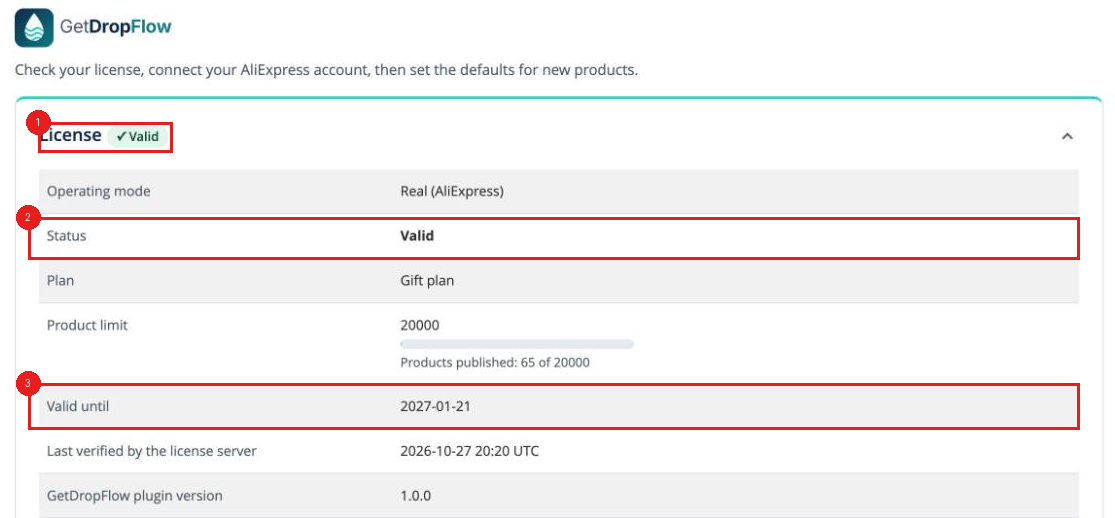
Red boxes: ① License ✓Valid; ② Status: Valid; ③ Valid until date.
8. "Connect AliExpress" says the admin address is not https, or the address has no real domain
- Cause: AliExpress can only send you back to an address that starts with https:// and has a real domain;
localhostor an address without a certificate does not work. - What to do: open the admin with your store's real https address (a padlock in the address bar) and try again. Ask your host to enable https if it is missing.
9. AliExpress sign-in fails or keeps asking for verification
- What to do: use your everyday browser, not a window controlled by automation tools. Sign in to AliExpress in another tab first, then press "Connect AliExpress" in the admin. If it says requests are being limited, wait a few minutes and try again.
C. Everyday use
10. I published products but cannot see them in the store
- What to do: ① published products are disabled: enable them in Magento (tutorial 3, step 4); ② Magento's cron must be running. Without cron, enabled products still do not show in search and category pages. Ask your host to confirm cron runs.
- Right after publishing, the product page says "Out of stock" and the cart button is missing: Magento fills its stock index in the background. With cron running, it is fine within a few minutes. To do it at once, an administrator runs
bin/magento indexer:reindex(on the server). If it is still out of stock after that, tell us your Magento version.
11. No shipping cost in the cart
- What to do: Stores → Configuration → Sales → Delivery Methods: turn on GetDropFlow live shipping (AliExpress) and fill in the fixed shipping table for the countries you sell to.
- The first add to cart says "no quotes are available", the next try works: when GetDropFlow asks AliExpress for the shipping price it waits at most 4 seconds and does not retry. If that one try fails (timeout, AliExpress limit), and there is no saved answer from the last 24 hours, and no fixed charge for the country, there is no shipping option. The failed try saves nothing, so the next one asks again and usually works. The first carts after an upgrade are the most likely to meet this, because an upgrade clears the cache. If you want a price even then, fill in a fixed charge for each country you sell to in the table above (empty means "no shipping offered" on purpose; it never becomes free shipping). To find the reason, look in
var/log/dropshipkit_shipping.logon the server for theFALLBACK_TABLE_USEDline and itsreason.
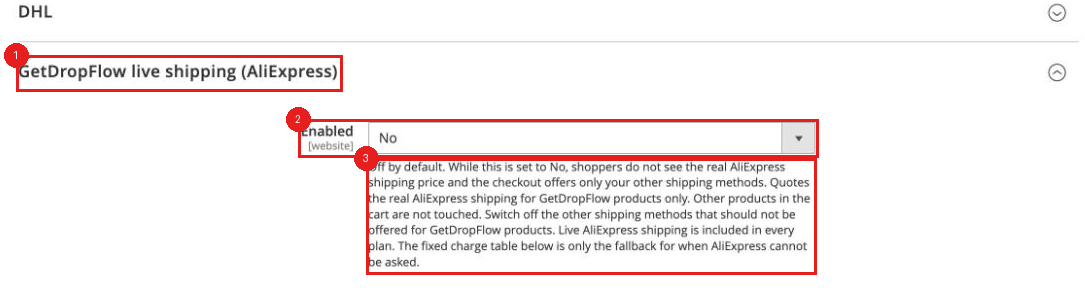
Red boxes: ① the GetDropFlow live shipping (AliExpress) block; ② Enabled is No here: set it to Yes; ③ the note below.
12. The AliExpress connection stops working after about two months
- What to do: GetDropFlow → Settings → Reconnect (re-authorise). The AliExpress authorisation has expired; it is not a fault.
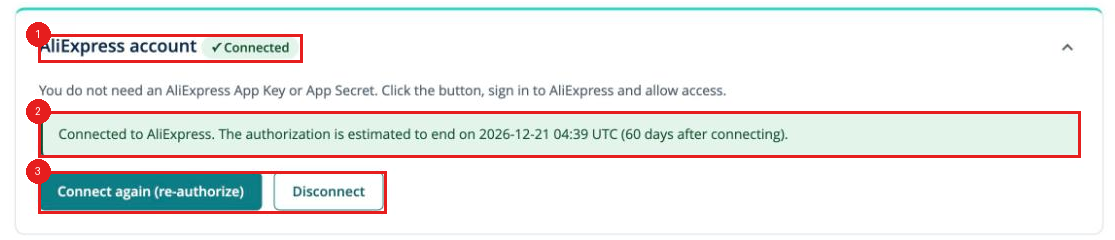
Red boxes: ① AliExpress account ✓Connected; ② the green note with the estimated end of the authorisation; ③ the Reconnect (re-authorise) button.
13. I do not know what went wrong
- What to do: open GetDropFlow → Logs and read the latest warnings and errors (keys, addresses and emails are hidden automatically). Send us that line: it is the fastest way to find the cause. From 0.2.23 the Logs page has a filter above the table: by level (all / warnings only / errors only) and by part of GetDropFlow. Times are shown in the store's time zone with its name (for example PDT), the same as on the Settings page, and the "important actions" table has a level column too.
- The words in brackets after a line: they are the numbers that came with that entry (for example "the saved answer is 1 hour(s) old"), written as plain text, not code.
- The product data file was not used: when a new file has fewer than half the products of the last one, Logs shows "The product data file was not replaced ...". For the same reason and the same last file it is written at most once every 6 hours (the review check on the settings page always shows the newest one), so the log is not filled with the same line. Reason and what to do: tutorial 09.
- The same line many times (0.2.23): identical entries (the same part, level, note and numbers) are shown as ONE line that ends with "Repeated N times; the first one was at ...". The background job builds each data file again every 10 minutes, and the warning "the product data file was built, and some products were left out or have a gap" used to be written every time: 16 hours of it filled all 200 places of the Logs page and pushed real errors out. Now that warning is written only when the set of reasons changes (a new reason, one gone, or products waiting for a shipping price starting or stopping), and at most once a day when nothing changed. It lists how many products there are for each reason, never product codes. When there are more than 200 entries, errors are kept before warnings.
- Reasons in words: for example "picture smaller than 1000 x 1500 (Pinterest): 395", no more codes such as
IMAGE_SMALL_FOR_PINTEREST. A long note is cut at the end of a word, never in the middle of one; hold the mouse over the line to read it in full.
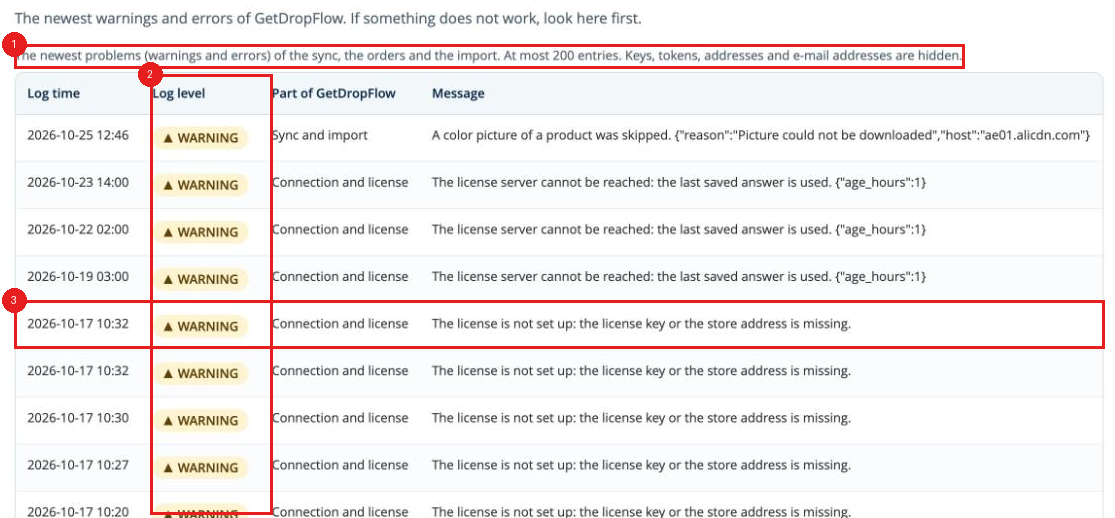
Red boxes: ① keys, tokens, addresses and e-mail addresses are hidden, so a screenshot is safe; ② the Log level column: WARNING is a warning, ERROR an error; ③ for example this line: the license is not set up (see item 7).
14. bin/magento says pdo_mysql extension is not installed
- What to do: the
phpon the command line is not the version your Magento uses, and it has no database extension. Run the command with the PHP your Magento needs, for examplephp8.4 bin/magento setup:upgrade(Magento 2.4.9 uses 8.4, 2.4.8 uses 8.3 or 8.4, 2.4.7 uses 8.2 or 8.3, 2.4.6 uses 8.2). Ask your host if you are not sure.
15. The installer stops with "GetDropFlow was installed with Composer", or "bin/magento cannot load the shop"
- Cause: an older GetDropFlow (DropshipKit) was installed in this store with Composer. Its leftovers (
vendor/dropshipkit,composer.lock,composer.json) would clash with the new copy inapp/code; after removing the Composer package, old generated code and cache can also makebin/magentocrash. - What to do: nothing was changed by the installer. Follow "Previously installed an old version (Composer)" in tutorial 10: back up,
composer remove dropshipkit/getdropflow(this already updatescomposer.lock; do not runcomposer updatewithout a package name, it upgrades every package of your shop), deletegenerated/code/DropshipKit, emptyvar/cacheandvar/page_cache, and if you use Redis/Valkey empty only this shop's cache database (redis-cli -n <cache database number> flushdb; the number is in thecachesection ofapp/etc/env.php; neverflushall, it also deletes login sessions and the data of other shops on the same server), thenphp bin/magento cache:flush, then run the installer again. Your database tables are kept. The message on the screen prints these commands with the right numbers from yourenv.php.
16. The install/upgrade script stops at the very start with "is not allowed to change" (permissions)
- Cause: the user who runs the script cannot write to
app/code,var,generatedorpub/static(or to some files inside them). A common reason is that commands were run as root earlier and left files owned by root. Without this check the script would stop half way because it cannot delete the old files. - What to do: the script stopped before changing anything, so the shop is not affected. The screen shows the command:
chown -R owner:group app/code var generated pub/static. Run it as root (or ask your host), then run the script again as the owner of the shop files (ls -ld app/codeshows the owner). If a permission error appears in the middle of an upgrade anyway, the script puts the old files back by itself; if it cannot put them all back, it says so and keeps the shop in maintenance mode: follow thechownand--rollbackcommands on the screen.
17. After an upgrade or rollback the admin pages of one language have no styles
- Cause: in production mode the static files were rebuilt for only some languages, missing the interface language that an admin user works in (for example es_ES, zh_Hans_CN). The new script deploys the store languages together with the interface language of every active admin user; the old script or the manual steps can miss it.
- What to do: run
php bin/magento setup:static-content:deploy -f en_US es_ES zh_Hans_CN(use all the languages you need, including the admin users' interface languages), thenphp bin/magento cache:flush.
18. A rollback or upgrade stopped and the shop stays in maintenance mode ("cannot delete generated/code")
- Cause: in production mode the web server user (for example
www-data) creates new files ingenerated/codewhenever visitors open pages, even while the shop shows the maintenance page. The user who runs the script cannot delete those files, so a step such asrm -rf generated/codefails. The script first checks all folders (also the files already insidegenerated,varandpub/static), switches maintenance mode on, then tries to deletegenerated/codeup to 4 times (2 seconds apart, with a second method). It never deletes the old module folder before that works. - What to do: read the part "Already changed" and "State right now" on the screen: it lists exactly what was changed. In most cases the script already put the shop back (modules enabled again, maintenance mode off) and says so. If it says the shop stays in maintenance mode, do this: 1) as root (or ask your host) run the
chowncommand shown on the screen, for examplechown -R owner:group app/code var generated pub/static; 2) run the same command again (for examplebash gdf-install.sh --rollback <backup folder>). It continues where it stopped and opens the shop at the end. No order or product data is lost. If you only want to open the shop now:php bin/magento module:enable DropshipKit_Catalog DropshipKit_Orders DropshipKit_Shipping DropshipKit_Core DropshipKit_Admin, thenphp bin/magento maintenance:disable(if that command does not run, delete the filevar/.maintenance.flag). - Compile and static files are repeated by themselves: on a busy shop the web user can also put new files into
generated/orvar/whilesetup:di:compile(or the static files step) is running, and that step stops with "Permission denied", "Unable to delete" or "File exists". The script now repeats such a step up to 3 times (you see "setup:di:compile: try 2 of 3"): before each try it looks again for files it may not change, emptiesgenerated/codeandgenerated/metadataagain after a short wait, and starts the step again (compile is safe to repeat). The same 3 tries apply tosetup:upgrade,module:enableandmodule:disable. If it still stops after 3 tries: the red STOP line names the real cause (the line ofbin/magento) and the exactchowncommand. Run thatchownas root (or ask your host), then run the same command again. What the screen says about the shop is true: in an upgrade the old files are put back and rebuilt automatically and the shop is opened again; if that rebuild also fails, and in a rollback, the shop is deliberately kept in maintenance mode (a shop with incomplete compiled code or missing styles is worse for buyers than the maintenance page). The screen then shows thechown, the same command to run again, andphp bin/magento maintenance:disablefor opening the shop by hand; opening it by hand means a slow storefront, possibly with pages without style, until the same command has been run successfully. The shop is opened by the script only when the rebuild really completed. Optional, needs root, never done by the script: if it keeps happening on a very busy shop, stop PHP-FPM (for examplesystemctl stop php8.3-fpm; visitors see a plain 502 page meanwhile), run the same command, and start it again (systemctl start php8.3-fpm). - Maintenance mode left on by a stopped run (P20). When the script itself switches maintenance mode on and then stops with it still on, it writes a small marker file
var/.gdf-installer-maintenance(time, command, version). After you run thechownand the same command again, the script sees the marker (younger than 24 hours), says "maintenance mode is ON because an earlier run of this script stopped and left it on" and switches maintenance mode off at its successful end, then deletes the marker. If maintenance mode was already on without such a marker (you switched it on yourself, or the marker is older than 24 hours), the script leaves it on, as before, and says so.
19. The small picture in the cart is the parent product's (for example the red dress), not the colour I chose
- Cause: this is a Magento setting, not a GetDropFlow fault. For a configurable product (colour x size) the cart shows the parent product's thumbnail by default. GetDropFlow does not change that default.
- What to do:
1. In the admin go to Stores → Settings → Configuration. 2. On the left open Sales → Checkout. 3. Expand Shopping Cart and find Configurable Product Image (if "Use system value" is ticked, untick it first). 4. Choose Product Thumbnail Itself instead of Parent Product Thumbnail. 5. Click Save Config, then refresh the cache under System → Cache Management, and add the product to the cart again.
- Note: with "Product Thumbnail Itself" the cart shows the thumbnail of the variant of the colour you chose; if a variant has no picture of its own, Magento still shows the parent's. The option names are written as in Magento's English admin (confirmed by two Magento how-to pages; not yet checked on a real store of ours).
20. The Logs page shows one "price and stock sync" round that was skipped
Message: "One round of the automatic price and stock sync was skipped because the GetDropFlow files were being replaced". An upgrade was running at that moment: Magento's scheduled jobs are not stopped by maintenance mode, so one round found the files half replaced. Nothing needs doing: the next round runs by itself a few minutes later. (Before 0.2.22 the same case was logged as an ERROR with a line like Class ... SyncResult not found; it means the same thing.) If the message comes back again and again when no upgrade is running, tell us.
21. Product search says "The search failed" or finds products that do not fit the words
"The search failed. AliExpress did not send results for these words and gave no reason." AliExpress answered "unknown error" for this search (the same words can work a minute later, and other words work). Wait a minute and search again, or try other words. If every search fails, open Logs and tell us what the "search failed" line says. Results that do not fit (fuses, diodes, ...): you typed Chinese words. This AliExpress search works with English words; search again with English words, for example summer dress. (Verified on the test store: summer dress gave 51217 fitting results, the Chinese words for the same thing gave 12669 results led by fuses and diodes. Whether AliExpress has a setting that would make Chinese work is not known (UNVERIFIED); the search sends the language en_US.)
22. The checkout offers only "Free Shipping $0.00" (and not "Standard shipping")
"Free Shipping - Free" is not a GetDropFlow method: it is Magento's own Free Shipping delivery method. GetDropFlow can only show $0.00 on its own when you set a free-shipping threshold or when AliExpress itself says the shipping is free, and then the line is named like the other GetDropFlow method ("Standard shipping ..."). GetDropFlow also hides every other method (Free Shipping, Flat Rate, Table Rates) in a cart with GetDropFlow products, when its own shipping is switched on and the setting "hide other methods" is on. So if you see only Free Shipping, one of these is true: GetDropFlow shipping is off, "hide other methods" is off, or the cart was not recognised as a GetDropFlow cart. Check in Stores → Configuration → Sales → Delivery Methods that GetDropFlow live shipping (AliExpress) → Enabled is Yes, that Hide the store's other shipping methods for GetDropFlow products is Yes, and that Free Shipping is No (the shop that showed this had it on, the shop with "Standard shipping $2.39" did not; which of the three it was is not verified yet, UNVERIFIED). Then clear the cache and try a new cart.
23. The product page and the search list show the old price, but the cart charges the new one
Cause: Magento keeps product pages in cache files. After a price change the old page sometimes cannot be cleared: the cache "tag index" loses entries when several processes write at once, so bin/magento cache:flush cannot find those old files (some cache files live for 30 days). What to do: in the Magento root, as the website user, run php bin/magento cache:flush; if the front price is still old, empty the files inside var/cache and var/page_cache (the files only, not the folders) and open the page again. From 0.2.24 the plugin deletes the old cache files of a product itself after it changes its price. (screenshot to be added)
24. A new product opens, but it is not in the category or in the search
Cause: Magento's category, price, stock and search indexes sometimes miss a product that was just published. Some products also lack a row in the price index. What to do: run php bin/magento indexer:reindex catalog_product_price cataloginventory_stock catalog_category_product catalogsearch_fulltext, then php bin/magento cache:flush. It takes a few minutes and changes no product or price. A product whose stock is 0 in every variant is hidden on the front by design; that is not a fault. (screenshot to be added)
25. Order emails show the sender example.com, or customers do not receive them
Check in this order: ① the sender under Stores → Configuration → Sales → Sales Emails and Store Email Addresses is an address on your own domain; ② the server can send mail: with Google Workspace, allow your server's IP in the Google Admin "SMTP relay service", send through it from the server's mail program (for example postfix), use your domain as the greeting name and fix the envelope sender to your support address; ③ look in the mail log for "bounced" and the reason. You do not need an SMTP user name and password in Magento: the "Sendmail" method is enough.
26. The SMTP user name and password in the Magento admin were filled in by the browser with your mailbox account
Browsers such as Chrome fill a saved mailbox password into the settings page, and saving stores it in the shop configuration. What to do: empty the user name and password in the mail (SMTP) settings and save; delete the saved password of this address in the browser's password manager; if the password already appeared in the configuration, change the password of that mailbox.
27. An upgrade or hotfix stops at the compile with "Directory not empty"
Files the website generated while running block the compile. What to do: as root, empty generated/code/* and generated/metadata/*, run setup:di:compile, then flush the cache and switch maintenance mode off. The upgrade and hotfix scripts include this step from v2 and restore everything if it fails.
28. Many errors in the Pinterest or Google product catalog
Read the error code in the diagnostics page first; do not change things by feel. What we have seen: Pinterest error 1008 (the platform says "technical difficulty") and warning 1306 (extra images rate-limited, HTTP 429); Google "adult content" or "identity and belief" notices, often caused by words such as sheer, see through, nude or a cross in the title. How to check: make sure the product pages and images open normally, then look for 429 in the server's website log (in CloudPanel it is logs/nginx-production/access.log of the site; images and static files are not logged by design). What to do: wait for the next ingest to see whether the platform's own errors remain; change the title of risky products or disable them; reduce the extra images if there are too many.
29. Where are the logs
The CloudPanel site logs are in /home/<site user>/logs/nginx-production/access.log and error.log. The server host-name site has another logs/nginx/ that is almost empty; do not read that one. Before reading a log, check in the nginx configuration where access_log points.
When you ask us for help, please tell us
- Which step you were on and what you clicked; 2. the red error on screen (text or screenshot); 3. your Magento version, PHP version (
php -v) and the name of your host or panel; 4. the last lines of the Logs page.
Contact
English drafted by AI, to be reviewed by a native speaker. This page grows with every new problem customers meet.
Rejected or suspended by Google Merchant Center
See "Rejected or suspended: what to do" at the end of tutorial 15.